At the end of the day, Shogun Exodus is a simulation game – simulating humans, needs, psychology, society, a world. And you can’t simulate a world, without simulating weather. Now, Shogun Exodus is not a Weather Simulator, and is not intended to become one, nonetheless it still has a fairly deep weather simulation mechanic behind it, that I want to make a bit more clear in this post.
Let me give you an example: Heavy Rain needs Dark Clouds to start in Shogun Exodus. Once it’s raining heavily, though, the clouds can thin to Very Cloudy and the downpour can continue. Thin them any further, and the rain has to weaken first.
That small difference between starting and continuing is part of how the weather works. Clouds and rain have their own states and timings, but the game plans them together so they don’t contradict each other. Fog has a different set of dependencies. Snow makes a temperature check when it starts, then keeps that choice even if the temperature changes.
This page describes the September 2026 development version. The numbers below are the current settings. Things may change in the future.
Weather runs on separate tracks
A Condition is one part of the weather or outdoor ambience. Each Condition has a track: a set of states with rules for moving between them. The Clouds track contains Clear Skies, Light Clouds, Cloudy, Very Cloudy, and Dark Clouds.
Each track occupies one state at a time. Several tracks can be active together, so Heavy Rain can occur with different wind strengths without needing a separately authored weather type for every combination.
| Track | What it describes |
|---|---|
| Clouds | Five sky states, from Clear Skies to Dark Clouds. |
| Wind | Seven strength brackets, with an exact speed between 1 and 140 km/h. |
| Precipitation | None, Light, normal, or Heavy precipitation. An episode appears as rain or snow. |
| Temperature | Nine brackets, with an exact temperature between −39°C and 49°C. |
| Fog | None, Light Fog, Fog, or Heavy Fog. |
| Fireflies | An ambient Condition that can appear when the time and weather allow it. |
“None” is a proper precipitation state, with its own likelihood and minimum duration. A dry spell is part of the plan too.
The five weather tracks allow moves to a neighbouring state or jumps over one intermediate state. Clear Skies can move directly to Cloudy, for example, but reaching Dark Clouds takes another move. Fireflies only need two states: present or absent.
Conditions are one of four layers. Planning clusters group the Conditions whose decisions depend on each other. The Controller keeps track of the current weather and plans its changes. Visual Effects draw what those Conditions ask for. Once it changes a Condition, the visual requests go through a mixer that resolves any overlap before passing the settings to the Effects.
Heavy Rain, for example, borrows a fog Effect to create haze. That doesn’t activate the Fog Condition or its rules. The same visual can be used for different purposes.
Dependencies decide which tracks belong together
If Clouds decided to clear while Precipitation independently chose Heavy Rain, we’d have a problem. The Controller avoids that by planning dependent tracks together.
Clouds and Precipitation form one cluster. Fog depends on Wind and Temperature, so those three form another. The groups are derived from the dependencies in the weather definitions. They aren’t a separate list that has to be kept up to date by hand.
Within a cluster, the Controller considers whole combinations. Dark Clouds with Heavy Rain is allowed; Clear Skies with Heavy Rain isn’t even an option. Each planning step changes one track, and the resulting combination must still be legal. The other cluster can carry on with its own plan.
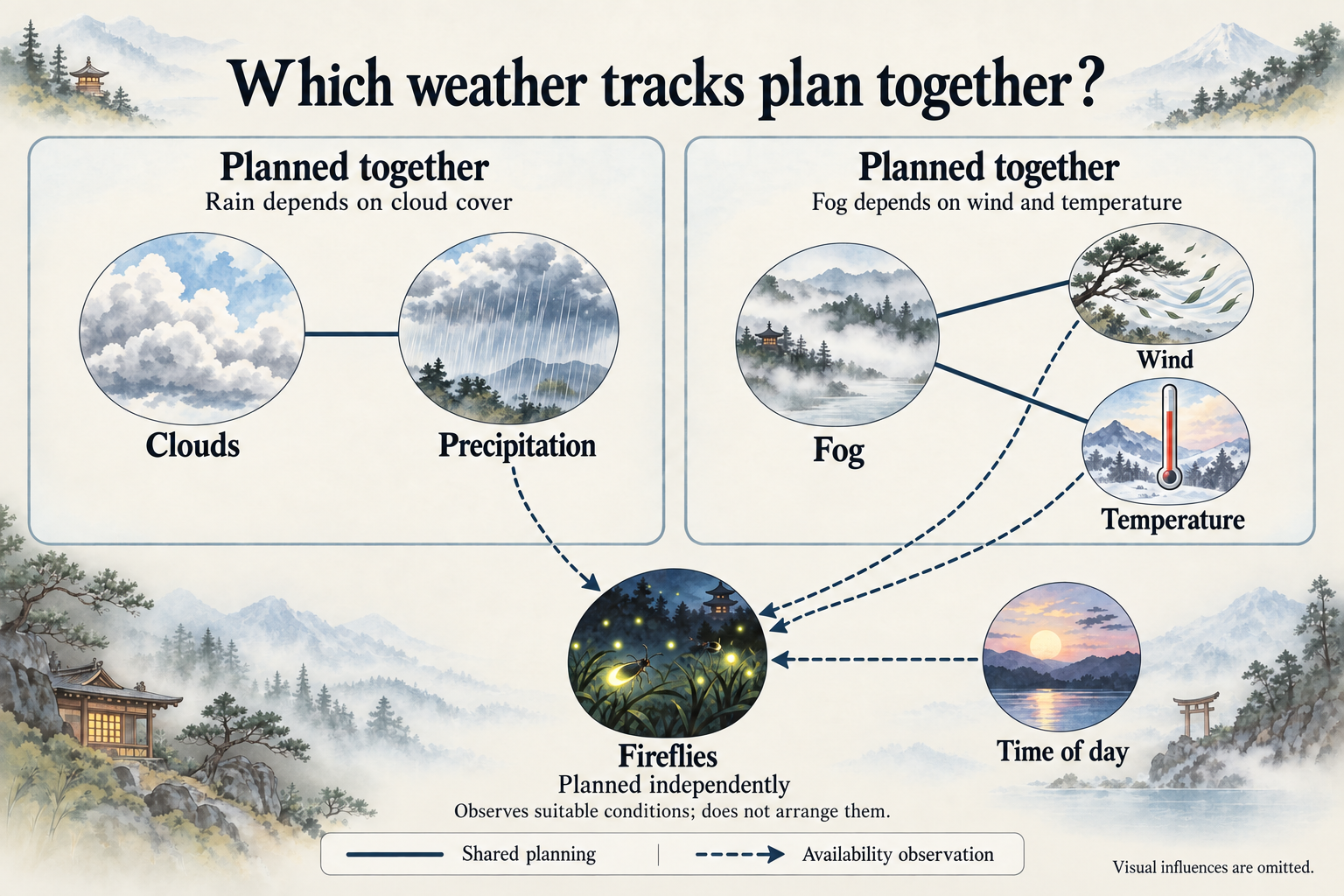
And yes, wind affects the way rain falls. But making rain lean sideways doesn’t require the two tracks to plan together. The rain Effect uses the wind strength it’s given. A dependency that controls whether weather is allowed to happen has a different job from a value that controls how it looks.
The planning rules distinguish between an entry requirement, which must be met to begin a state, and a persistence requirement, which must hold for it to remain active.
This is the distinction behind the Heavy Rain example at the start. Dark Clouds satisfies both requirements. Very Cloudy satisfies only persistence, so it can support a downpour that’s already underway. For the sky to thin further to Cloudy, the precipitation must weaken first.
Ordinary Rain needs at least Cloudy skies to start, but can continue under Light Clouds. Light Rain needs at least Light Clouds throughout. Before the sky can become completely clear, natural precipitation has to stop.
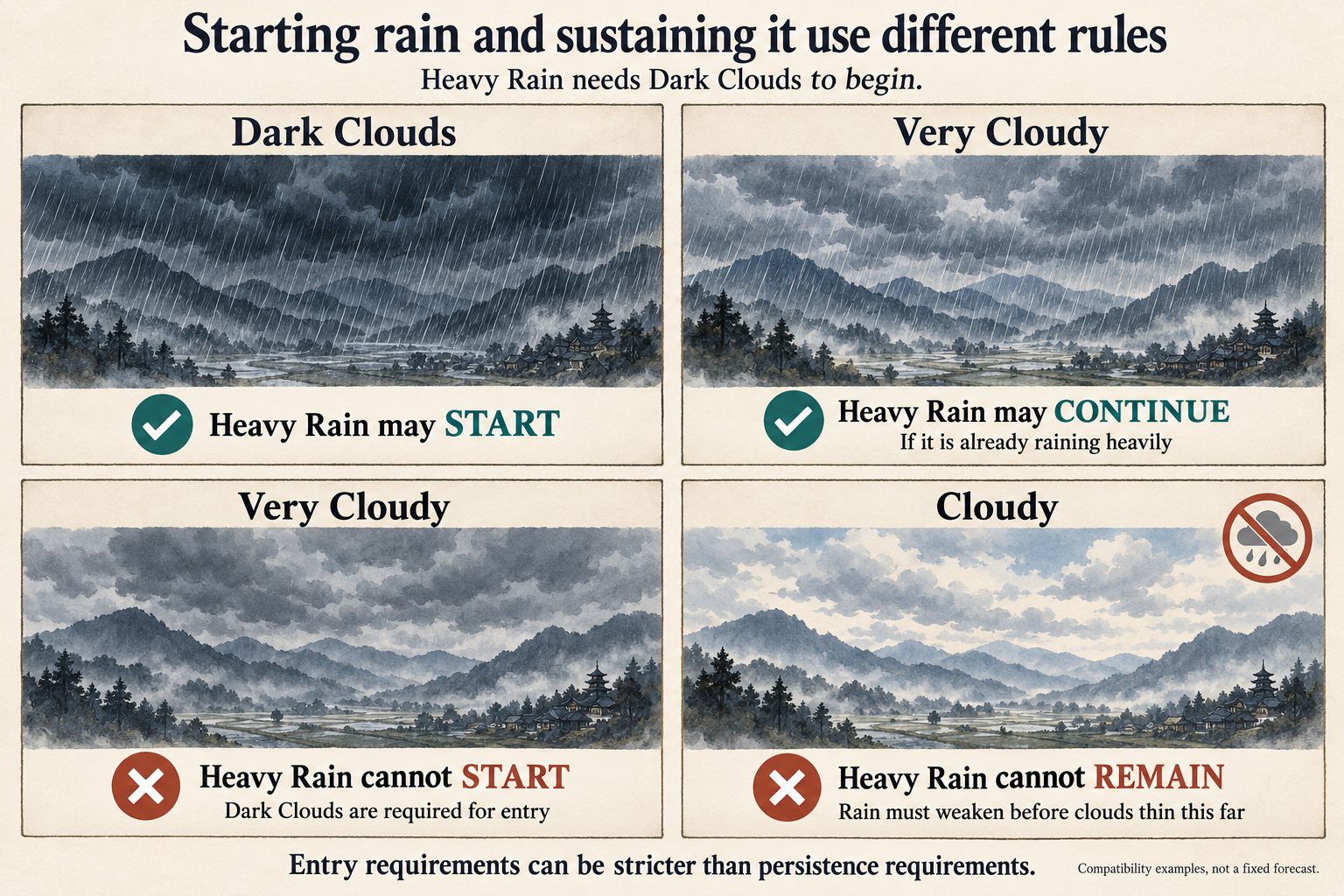
That’s called hysteresis. A thermostat uses the same idea when it switches heating on at one temperature and off at a higher one, rather than constantly switching at a single threshold. Here, the gap lets a storm trail off as the clouds ease.
Fog uses the same principle. Ordinary Fog can form during Calm Winds or a Gentle Breeze, and can remain when the wind becomes Windy. Light Fog tolerates still more wind once established. Heavy Fog is stricter: it requires Calm Winds or a Gentle Breeze throughout. All three visible fog states require Temperature to be in one of the Very Cold, Cold, Cool, or Warm brackets, covering the current −19°C to 19°C target range. Clouds and precipitation are not prerequisites for Fog.
The Controller chooses somewhere to go
The Controller searches for combinations it can reach within five state changes of the current weather. It makes a weighted random choice among those destinations, then schedules a shortest legal route to the chosen one.
“So it’s still rolling dice,” you might say. Yes. The dice choose among reachable outcomes. Getting to one still requires the clouds and precipitation to follow their rules.
Five changes can cover much more than five hours, because each track has its own waiting times. Staying where it is also counts as a possible outcome. The Controller doesn’t have to change something every time it makes a plan.
From Cloudy with no precipitation, one legal route to Dark Clouds with Heavy Rain is to darken the clouds, start Light Rain, then move to Heavy Rain. A route through ordinary Rain is also possible. The allowed connections determine the available paths; every storm doesn’t have to pass through every intensity.
So darkening clouds give you a reason to expect rain, without guaranteeing it. The Controller may choose to leave the precipitation track at None.
Climate changes the odds
Every state has a base weight. The local biome modifies that weight through its characteristics, with an optional adjustment for a particular named biome. Terrain influences Clouds and Wind; rainfall influences Precipitation and Fog; the biome’s temperature characteristic influences Temperature.
Those adjustments multiply together. The weight of a candidate combination is then the product of its member states’ weights. Only reachable, eligible combinations participate in that choice, so a strong preference for Heavy Rain cannot bypass the cloud requirements.
The current Heavy Rain weight is 5.00 in a wet biome, 1.50 in a normal-rainfall biome, and 0.135 in a dry biome. For no precipitation, those weights are 0.75, 1.50, and 3.00. So the wet biome strongly favours Heavy Rain over a dry spell, while the dry biome strongly favours the reverse.
A weight of 5 isn’t a 5% chance. It only has meaning relative to the other candidates, and those candidates are complete combinations of clouds and precipitation. Time spent getting to a state and waiting in it also affects how much rain you actually see. You can’t read the weights as percentages of rainy days.
A new modded biome can use these same rules. Give it the wet rainfall characteristic and it inherits the wet-weather multipliers, without needing weather definitions written specifically for its name.
Every track gets time to settle
Each state has a minimum stay, called its dwell. The Controller rolls that minimum within the state’s configured range. Heavy Rain currently rolls between 3 and 11 in-game hours, while no precipitation rolls between 6 and 16.
If Heavy Rain receives a five-hour dwell and the clouds change two hours later, the rain still has three hours left on its own timer. Moving one track doesn’t spend another track’s waiting time for it. Each scheduled step must wait for its track’s dwell and for the previous step in the plan.
That means the rain can last longer than its rolled dwell. Once the cluster reaches its goal, all its members must finish their minimum stays before it chooses again. If the clouds are still waiting, precipitation waits with them. The 11-hour upper end of the Heavy Rain dwell range therefore isn’t a limit on how long a downpour can last.
The visible change has its own duration. Rain fades between intensities over 30 in-game minutes; Fog takes an hour. The dwell controls when the next transition is allowed, while the fade controls how the current transition looks. Both follow game time, including pause and speed changes.
Wind and temperature have values between the labels
“Windy” is a useful label, but it covers a range. The current Windy bracket contains target speeds from 20 to 38 km/h, and the system also stores the exact speed. It can move from 24 to 32 to 28 km/h while remaining in that same bracket.
The Controller picks an exact target inside the chosen bracket and the value moves towards it over time. The label changes when the value crosses into another bracket, and the destination’s dwell starts when the target is reached. Temperature changes take one in-game hour. Wind takes between one and two hours, depending on the destination bracket.
Wind affects cloud drift, the movement of rain and snow, and the horizontal drift of fog. Each Effect has its own response. Fog can drift a little faster while the rain is pushed much more visibly sideways.
The full 1–140 km/h wind range can occur naturally. The strongest brackets are made uncommon through their weights and position in the transition graph. Temperature likewise uses its full −39°C to 49°C range, with biome preferences making the extremes much more or less likely.
Snow is chosen at the start of an episode
When precipitation starts, the game checks the exact temperature at that entry time. At −1°C or below, the episode uses Snow. Above that threshold, it uses Rain. The precipitation track then keeps that choice until it returns to None.
A snowfall that starts at −5°C will still be snow if the temperature later reaches 3°C. It can grow heavier or lighter during that time. It only gets a new rain-or-snow decision after precipitation stops and another episode begins. An existing rainy spell likewise stays rainy when the temperature drops. Saving and loading preserves the choice.
This is a simplification. Snow uses the same intensity steps, cloud requirements, weights, and timing as Rain, with different visuals and player-facing text. There isn’t a separate freezing or melting calculation, or accumulated snow. The temperature check decides what kind of episode you’re going to see.
Fireflies wait for an opportunity
Fireflies wait for suitable weather. They don’t get to make the wind calm down or the rain stop, which is why their track stays outside the two shared planning clusters.
They can appear from 19:00 until just before 04:00. Precipitation must be None, Wind must be Calm or a Gentle Breeze, and Temperature must be Warm, Very Warm, or Hot (the 10°C to 39°C target brackets). Clouds and Fog don’t matter here. Even when all those requirements are met, Fireflies still have to be selected by their own weighted plan. They won’t appear every suitable night.
Existing fireflies can stay past 04:00, but stop at 06:00 at the latest. Their plan can end them earlier, and unsuitable weather ends them too. Rain starting overrides their usual minimum stay.
While they’re active, Beautiful fireflies gives +10 Happiness to living characters in the scene, including the Shogun and Servants. Nobody has to stand next to a particular insect to receive it. The bonus ends with the Condition, even if the last visible fireflies are still fading away.
Several Conditions can share the same visual
Each active Condition can request several Effects. Cloud states use two cloud layers, placed at different depths around the mountains. Fog combines moving mist with depth layers that obscure distant scenery. Temperature can alter the background’s colour treatment and add frost or heat borders at extremes.
When two Conditions request the same Effect at the same depth, the mixer resolves their settings into one request. At equal priority it takes the larger numeric value for each setting, which is why those settings are defined so that larger means more intense. A higher-priority request wins over the lower-priority one.
That’s how the rain haze mentioned earlier can coexist with Fog. Heavy Rain requests the mist Effect at a lower priority, so actual Fog takes control when both are active. They share one mist layer. Heavy Snow uses a similar haze treatment.
Cloud cover also modifies the day-and-night lighting. It reduces daylight and dulls the light’s colour cast, while the sky washes towards an overcast tone. The darkening scales with how much daylight remains. At peak night there’s no daylight left to block, so clouds don’t push an already dark scene towards black. A cloudy dawn still has its dawn colouring, just dulled.
The Controller can also be given a destination
A request can tell the Controller to reach particular weather through the allowed transitions. It can let go once the target is reached or hold that weather until the request is removed. Priorities decide which request wins if more than one source wants control.
The first move of each affected track can bypass its old dwell, so a request can interrupt a long wait. Later moves keep normal timing. When the request lets go, planning continues from the weather that now exists. It doesn’t put back the sunny afternoon from before the interruption.
The Developer Tools I’ve implemented already use this for gradual weather spawning and holding weather during testing. Their separate Force action changes a state instantly and can ignore compatibility rules. Clear Skies with Heavy Rain is possible through that cheat, even though the natural planner rejects it.
Future story events could use weather requests too. The planned rare phenomena would use the same Condition structure: a monsoon could take control of several tracks, while a meteor shower could coexist without taking them over. The scheduler for those phenomena and the rules for taking over tracks aren’t implemented yet.
Predicting Weather
A key point in how the Weather works in Shogun Exodus, is that it will let the player, over time, learn to expect certain weather. You see dark clouds forming in the sky, which you know is a prerequisite to Heavy Rain. Of course, Heavy Rain isn’t guaranteed, but you now know it’s a possibility. At the same time, you know that if Rain is coming, there won’t be any Fireflies. Likewise, if you see the temperature drop below zero, you know there won’t be any Fog coming until the temperature goes back up.
This way, the player learns to predict certain weather conditions by how the weather actually behaves in-game, much like you would in real life. If I open my window, see clouds everywhere, I know there’s a good chance of Rain. Same in Shogun Exodus.
And the player learns to do this simply by playing the game, not by reading menus that specifically tell them what weather is coming.
Expandability
Being able to expand the types of weather conditions the game has in the future was a key consideration in setting all this up, as it is with most game mechanics. The way the system is now, will allow me to create new and interesting weather conditions, think “Acid Rain” or a “Meteor Storm” for instance, in the future.
New weather can be added through the same definitions. Thunder could have its own track because it can coexist with precipitation. Hail with different planning rules would belong on the precipitation track, where it would be mutually exclusive with rain. Snow already shows how to give an existing episode a different appearance. Mods can change these definitions and their visual presets.
This also means that modders can easily change weather, or add in their own weather conditions and effects, in the future if they so wish.
What the weather actually changes for Servants
The +10 Happiness from Fireflies is currently the weather system’s only implemented character effect. Rain doesn’t make Servants wet or check whether they’re sheltered. Temperature doesn’t yet cause damage or simulate exposure and room heating, and Fog has no gameplay effect. For now, “Deathly Freezing” describes a temperature bracket. The weather can reach that temperature and show it on screen, but the survival consequences still need to be built.
However, that doesn’t mean that weather isn’t intended to impact gameplay, it just means I haven’t implemented it yet. As with much of Shogun Exodus, I’m creating things in as logical a way as possible, creating all the foundational building blocks first before building the house, so that future features can rely on those foundational building blocks – that also means that I often need to create systems, before those systems have any impact on gameplay. Weather is an example of that.
In the future though, weather conditions are of course intended to impact gameplay in a variety of ways, though exactly how is largely still undetermined.
But one example would be Power Generation. Currently the game just has a singular Generator for generating Power (another example of creating a system before having it impact anything, as nothing in the game currently requires power), powered by Carbon Ores. Future power generators however will also include Solar Power as well as Wind Power – in those cases, Cloud Coverage will impact solar power generation, and Wind Speed will impact wind power generation.
For now, other conditions such as Rain/Snow is more intended to impact the future implementation of Missions/Expeditions that you can send Servants on, or go on yourself as the Shogun. Heavy Rain might then be used to make travel more difficult or slow. Perhaps Fog would impact the chances of finding loot. Perhaps Deathly temperature conditions would give a constant Health drain for the pawn while they’re on such missions outside of the Castle.
However, for now, Weather mostly exists as a System that I can easily build upon and expand in the future whenever needed, so that when I implement gameplay features that I would like to be impacted by Weather, I can easily plug those features into my already existing system.